Your browser (Internet Explorer 6) is out of date. It has known security flaws and may not display all features of this and other websites. Learn how to update your browser.
I got around doing the final episode of my little screencast series on
UltiSnips. This time I talk about Python interpolation and give an example
of a snippet that really makes my life easier.
I always wanted to have a few screencasts showing off the main features of
UltiSnips but nobody was willing to take the time and effort to produce them. Now
that I've done it myself I can understand why: It takes a lot of time. From
start to finish - planing, recording, cutting, uploading and promoting one
screencast of roughly ten minutes takes approximately six to eight hours. It
was a lot of fun doing the casts though and I learned a lot. I am also
reasonably pleased with the final results.
If someone suggest a really good topic for a fifth screencast, I will consider
making one. But I feel that UltiSnips' main features are well covered now.
Thanks for sticking with me throughout the series!
I just release UltiSnips 2.0 together with a short screencast to run you
through the new features.
2.0 is a killer-feature release for me: Having normal mode editing and $VISUAL
support adds a lot of value to UltiSnips for me.
UltiSnips now has all the features I initially expected from a snippet plugin
when I started out writing it. It was not an easy road getting here but I am
proud what we have achieved. I consider it now mostly feature complete - I
will not object to good ideas for new features that enhance the user experience
but we will try as best as we can to avoid feature creep. UltiSnips
wants to be only one thing - the ultimate solution for snippets in Vim.
Last time I talked about the beautiful linear Algebra interpretation of
Least Squares which adds a wonderful geometric interpretation to the
analytical footwork we had to do before. This time I will borrow from a
video I saw on Khan Academy a long time ago. I connects some of the
elemental principles of statistics with regression.
The basic idea is similar to the analytical approach. But this time, we will
only try to fit a line to / pairs. So, we
have a model of the form
The squared errors between model and data is then
Of course, we search for the global minima of this solution with respect to
the parameters and . So let's find the derivations:
We can conveniently drop the 2 that appears in front of all terms.
We will now rewrite these equations by using the definition of the sample mean:
This gives:
Let's loose the s and solve for and .
If you look closely at the term for the slope you see that this is
actually just the covariance of and divided by the variance of .
I find this very intriguing.
Second screencast is done and ready! If you have not yet seen the first,
look over here. This was done under the maxim Done is
better than perfect. I had more advanced explanations planed, but the
screencast turned out to be longer than expected. I therefore opted for a
complete overview over the most common features of UltiSnips and will explain
some cooler stuff in this blog post.
So here is the video. You can find some snippets with their explanation below.
Elements inside of default text
Placeholders can contain other UltiSnips elements. This is totally cool and
very useful. For example, the following snippet is defined for the html file
type and ships with UltiSnips:
snippet a
<a href="$1"${2: class="${3:link}"}>
$0
</a>
endsnippet
It allows to either delete the complete tabstop 2 with one keystroke. Or you
can jump to tabstop 3 and replace the CSS class name.
Another example:
snippet date
${2:${1:`date +%d`}.`date +%m`}.`date +%Y`
endsnippet
This snippet will enter the current date in the format that is used in
Germany: dd.mm.yyyy. Jumping forward will allow you to either overwrite the
day or the day and the month. I use this in my todo files to enter due
dates.
Complete Scripts in Shell Interpolation
Shell interpolation is as powerful as the shell itself. Here is a silly
example that is basically a complete Perl script:
snippetrandom`#!/usr/bin/perluse LWP::Simple qw(get);my $page = get "http://www.random.org/integers/?num=1&min=1&max=100&col=1&base=10&format=plain&rnd=new";print $page`endsnippet
This snippet will insert a truly random number between 1 and 100 fetched from
random.org. Useful? Maybe not, but a good example.
Transformations are more powerful than you might think
This transformation shows the transformation option g which means
global replace. It will uppercase every word in the first tabstop while
mirroring its content.
snippet title "Titelize in the Transformation"${1:a text}${1/\w+\s*/\u$0/g}
endsnippet
In the replacement part of this transformation, the u means "uppercase the
next character" and the $0 matches everything found. The complete
transformation basically says: find a word \w+ and any number of whitespace
\s* and replace them through what you found, but uppercase one char. The g
at the end makes sure that not only the first but all words are uppercased.
Conditional replacements
One feature that I didn't mention in the screencast are conditional
replacements. When you capture a group in the search part of a replacement,
you can check if it was matched in the replacement like so: (?<number>:yes text:no text).
yes text will be inserted if the group was matched, otherwise no text will
be inserted. A quick example:
The transformation will match a o at the beginning into group 1 or a t at
the beginning in group 2. The rest of the search string just matches
everything of the first tabstop. The replacement will either be ne when a
o was matched, wo when a t was matched or an empty string. That means
that you can just type a t to quickly get two as the complete content of
the snippet or a o to get one. If you type anything else, you only get the
content of the place holder, i.e. the verbatim of what you typed.
Inword triggers
The snippet option 'i' stands for inword trigger. Let's
say for some coding project, I often want to get variables that end on izer:
maperizer, vectorizer... I want to define a snippet with ri which should
expand to izer. Triggers are always matched to full words though - except
for when you use the i option for your snippet:
snippet ri "rizer" i
rizer
endsnippet
This does what I want: maperi<tab> -> maperizer.
Regular Expression triggers
Regular expression triggers can be used with the r option to a snippet. Note
that you have to add delimiters around your trigger when using regular
expression triggers. I use the following snippet because I can never remember
on which exact trigger I set my chapter snippet:
This will expand on either cha, chap, chapt, chapte or chapter.
Regular Expression triggers are even more powerful because you can get access
the to match object inside your python interpolation blocks. More on that
in the next episode.
Regular expression triggers also allow to define triggers with special
characters, whitespace or multi word triggers.
snippet " this is a trigger""Multiword & Whitespace" r
Hello World
endsnippet
Conclusion
The features we discussed so far are enough to make crazy snippets and will
suffice for most uses. If you ever feel lost or forget how to use one of the
features, take a look into UltiSnips help document, either via
Next time we will discuss python interpolation which brings even more power to
snippets. With it, some of the features we discussed so far will become easier
to read with and others will only then become possible. With python
interpolation there is basically nothing that a snippet can't do.
As always, leave comments and let me know what you think about the screencast
and the tips. Also let me know what you are interested in and what you would
like to see in future screencasts. I have no more topics for a fourth
screencast, so if you want one, let me know what you want to see in it.
Overlapping windows are a bad invention. Frankly, the one UI that works are
virtual desktops with non overlapping windows (e.g. window managers).
Given, the world becomes sane slowly with iOS leading the way: every
application is full screen there.
On Mac OS X, the situation is dire: windows just open wherever they want to. I
wrote a python script a while ago that can be called quickly from Quicksilver
or LaunchBar which took a simple syntax to describe where you want your
window and moved it there. Problem: it was rather slow. It needed to run and
parse a command line tool to get number of screens and resolutions and it had
to ask for the frontmost application via AppleScript.
I got fed up with that yesterday and made it fast. Getting the frontmost
application and the number of screens and their resolution is now done via the
Carbon Framework in a C Extension. You can find the source code on GitHub,
download from there and use pip to install:
You want to call this from LaunchBar or Quicksilver, so install/make a proper
AppleScript (I ship one in contrib). The tool takes the following syntax:
move_window <screen_id><nr of x parts><x span><nr of y parts><y span>
Some examples
move_window 0 # Disp 0, full Screen
move_window 02 # Disp 0, left half of screen
move_window 030 # Disp 0, left third of screen
move_window 031-2 # Disp 0, rightmost two thirds of screen
move_window 12121 # Disp 1, bottom right quarter of screen
I finally got the technicalities sorted out, some inspiration and the time to
make a first screencast about UltiSnips. It is not so much about the specifics
in UltiSnips but rather an overview what snippets are and a demo reel of some
of UltiSnips features.
Let me know in the comments what you would like to see in future episodes!
Last time, we introduce the least squares problem and took a direct
approach to solving it. Basically we just minimized the -distance
of a model to the data by varying the parameters of the model. Today,
we find a completely different, but very neat interpretation.
Suppose we have the following problem: There is a set of linear equations without a
solution, e.q. a matrix and a vector so
that no vector exists that would solve the equation.
Bummer. What does that actually mean though? If we use every possible value of
in this equation, we get essentially all linear combinations
of the column vectors of . That is a span of vectors. That is a
subspace. So, is not in our subspace, otherwise we would find
an that would solve our linear equation.
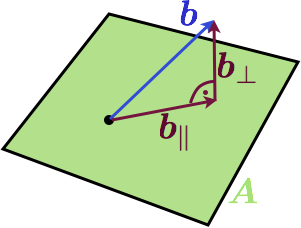
Here is a visualization in 3D when A is a two dimensional matrix:
The column space of the matrix is a plane and is not in the plane. A natural question
now is: what is the vector in the column space of that is the best approximation to .
But what is a good approximation? Well, how about the Euclidian distance between the endpoints of the vectors.
If we choose this criteria, there is a simple solution: the projection of to will
give the best approximation. Here is another image:
We have decomposed into its best approximation in
which we call and a component that
is orthogonal to it called . At the end of the day, we
are interested in a best approximated solution to our original equation, so we
are not really interested in finding , but rather an
so that
Lets look for an equation for this . We will start out by
using that the two components of are perpendicular to each
other. And we will also express through vector addition.
Since can't be zero, the term in parenthesis must be. This
directly yields the least squares formula again:
Conclusion
We did the exact same thing as in the last post, but this time we took another
approach and quite a different world view on the problem. The least squares
solution came up very naturally here and with a very simple geometric
interpretation (at least in the 3d case, the approach is also valid for other
dimensions though).
The last iteration of this series will take a look at least squares in statistical
models.
Here we go again. After a long time of travelling and illness something new on
this blog. Today, I start a new mini series that takes a look at Least Squares
in various ways. I want to show how least squares arises naturally in various
areas - of course this will look at little similar all the time because it
stays the same principle; but the basic approach depends on the context.
Today we start with a simple example and the method I'll call the direct
approach.
The direct method
Suppose we have some kind of measurement process that measures every second
and we know that the system we measure follows a model of third order, that is
the values we expect are
But obviously, our measurement process is in some way noisy. Our aim is now to
find good values for and . But what is good? Well,
why not start by minimizing the distance between our model prediction and the
measurement values?
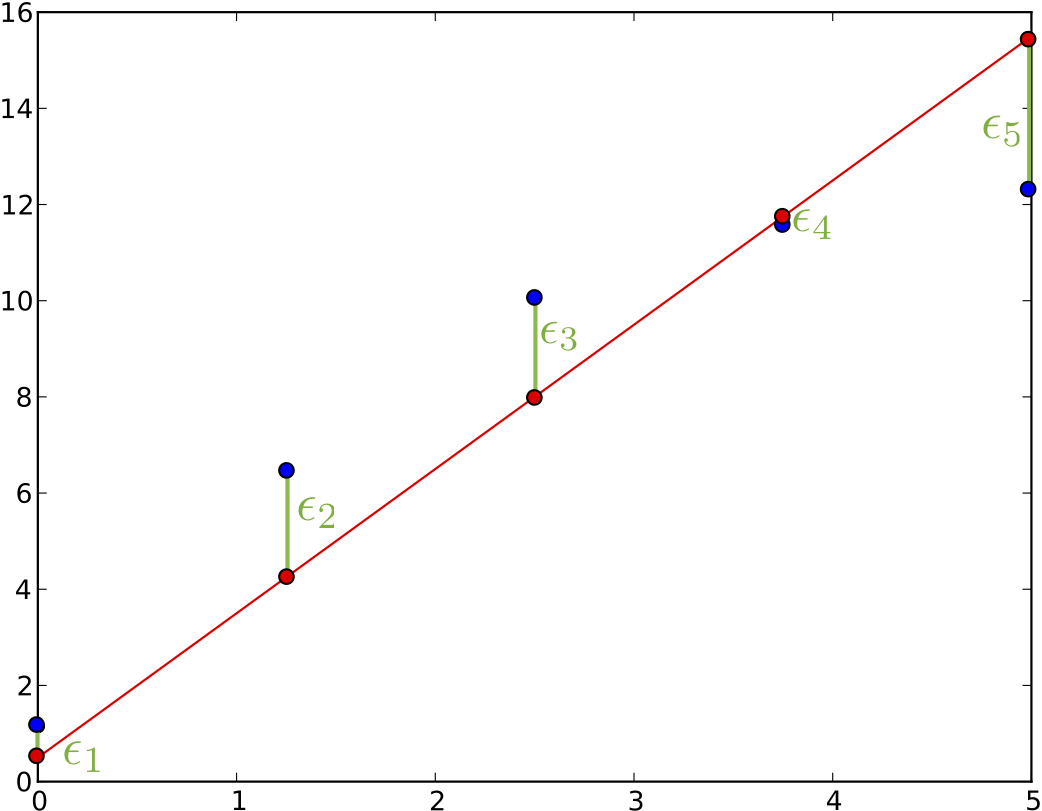
In this plot we see our measurements as blue dots and we see an awful model
fit as red line. And we see various bars. Those are the
errors we want to minimize, the model prediction at a point :
minus the value that we measured at this point :
It seems like a bit of a stretch to write this simple equation in a matrix
notation there in the last step. But it will benefit us in a moment.
We do not want to minimize the straight sum of those because positive and
negative values might zero out. The absolute value is also not so easy because
our error function is then non-smooth... Let's summarize the sum of squares of the
individual errors:
Minimization is best when we have a quadratic error function because
there is only a single global minimum which can be found by setting the
gradient to zero.
The notation of this minimization becomes a bit tedious, that's why we go back
to the matrix notation we used earlier and realize that we can stack all
measurements we have into one matrix. Working with vectors will make the
derivatives easier to do:
Our error function then becomes
Finding the gradient of S with respect to the parameter vector is now easy. We also immediately
set this equal to the zero vector to find the minimum of this function:
And so we find the parameters that minimizes the error to be
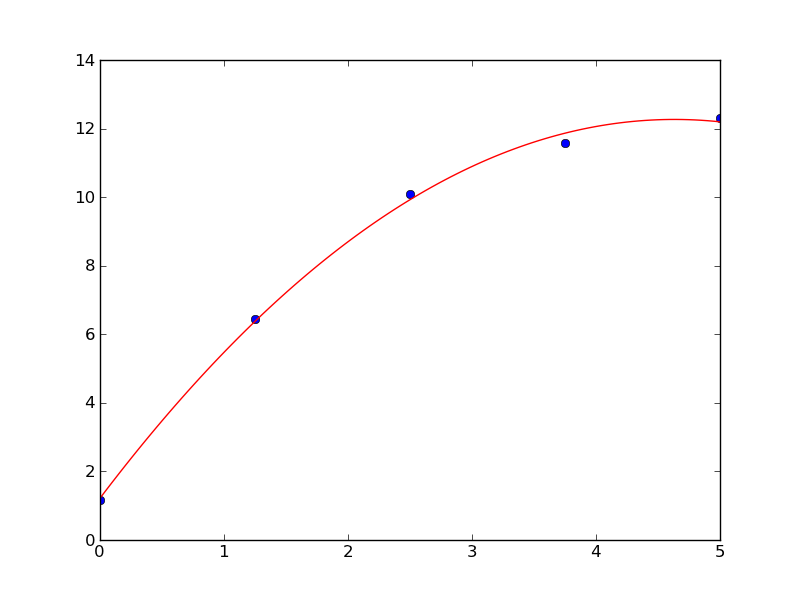
Using this with the above example we get the following best fit
Conclusion
I call this the direct approach because we directly set out to minimize the
quantity and the least square formula pops out. There are other goals one can
set out to achieve which leads to the same formula which I will show in some
of the next posts. Hopefully it will not take as long again till I find some
time to post again.
Let's continue our discoveries in Chapter 7 of the Book by discussing
my solution to 7.P1.
We have talked the de-Casteljau algorithm before. It is an expensive
but numerically stable way to calculate the points on a Bézier curve given
it's control Polgon. Just to remember, this is how it is calculated:
Given the points , . Set
Then is the point with the parameter on the
corresponding Beziér curve.
Another common approach to interpolation is to use Polynoms of degree
. We than also need some that
corresponds to the given , if they aren't given we can just
set them so that they are equally distributed betwenn .
Aitken's Algorithm is than defined by
Given the points , with corresponding
and the position of the interpolation . Set
Then is the point with the parameter on the
corresponding interpolating Polynom.
The geometric interpretation is the following: We start out with point 0 and 1
and interpolate linearly between them, than we take 1 and 2 and so on. In the
next step, we linearly interpolate between the linear interpolations of the
last round by blending the one into the other. The degree of the interpolation
polynom increses in each step by one.
The differences between de-Casteljau and Aitken's algorithm in each step are
quite simple: The first one is a mapping from
while the second one is mapping from .
We can provide a straight forward combination of those two algorithms by
mapping from the interval
with an , that is, we linearly interpolate
between the two intervals. Let's define a quick helper function:
Using this, the generalized algorithm looks like this
Given the points , with corresponding ,
a blending factor and the position of the
interpolation . Set
Then is the point with the parameter on the
corresponding blend between Bézier and Polynomial interpolation.
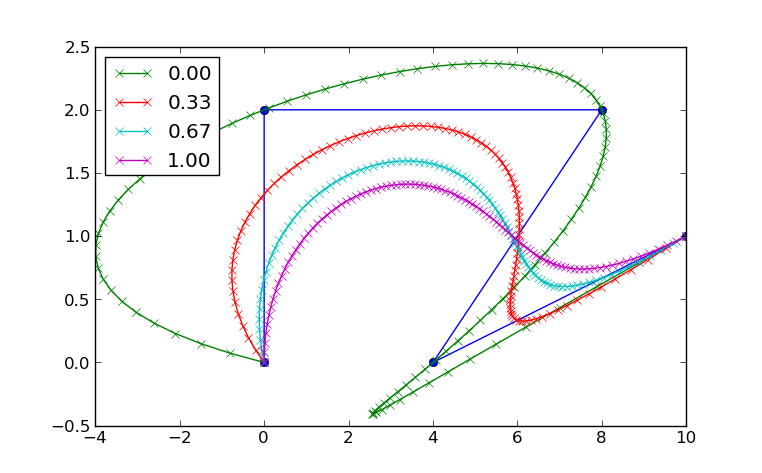
The De-Casteljau algorithm is the special case for , Aitken's Algorithm
is the special case for . Here is a plot of a planar interpolation:
See how the curve for passes through all 4 points. This is
a property of Lagrange interpolation (polynomial interpolation). The curve for
is the only one that stays in the convex hull of the points;
this is a property of Bézier curves.
As always, you can find the complete code for this post in the GitHub
repository under chap07. Also, Farin has written a paper on this very topic.
You can find it here.
I just added a calendar widget on each page where it makes sense here. I am
not sure how useful it is, so I will try it out for a while and remove it
again if it makes no sense.
I also improved the blog archive list in the right navigation bar. I was
inspired by something I saw on Guido's blog, namely a folding tree view. I
am aware that most blogging tools like Wordpress have this feature build in,
but I realized the first time how useful it is on Guido's page. So I copied
it. Turned out that you only need a little bit of Javascript and CSS. I
basically followed the short but concise tutorial by David Herron. I only
needed very few adjustments, but they were trivial thanks to the beauty that
is jQuery.
Continuing with my reading efforts in Curves and Surfaces for GACD
by Gerald Farin, I will talk today about a topic that comes up
in chapter 6: elevating and reducing the degree of a Bézier curve.
Elevating the dimensionality
First, we start out by proving that the degree of a Bézier curve can always be
elevated without the curve being changed.
A curve with the control polygon
can be represented as a Bézier curve
using the Bernstein Polynomials as basis:
We will now prove that we can increase the degree from to
and still keep the same curve, given we choose then new control polygon
accordingly.
We start out by rewriting as
And now we show that the terms can be rewritten as a sum from 0 to n+1. Let's
start with the first term:
Easy. Now the second one
Now, we plug this into the summation formula. We can readjust the summation
variables cleverly by noting that we only add 0 terms and we get the formula:
Now all there is to do is to compare the coefficients for old control polygon
points and new polygon points and we have our solution: the new points are
linear interpolations of the old ones. We can find the new points from the old
by a simple Matrix multiplication:
with the Matrix being of shape and
looking something like this:
Degree Reduction
The hard work is already done now: It only remains to say that we indeed find
the best approximation to our Bézier curve (in the least squares sense) by
finding the least-squares solution to the inverse of the system of equations given
in the Matrix equation. Therefore, we find the best degree reduced control
polygon by
And here is an example from inside Blender. The highlighted objects are the
reduced control polygon (n=4) and its Bézier curve. The non highlighted are the
originals with one degree higher (5).
Generators are iterators over things made up on runtime. For example if you
ask me about the Fibonacci sequence, I can generate an infinite amount of them
by only remembering the two numbers before:
Generators are quite useful for programming. Python has them, Haskell is
basically build around them (I think they call them infinite lists).
Generating the Fibonacci sequence up to a maximum number maxn looks like
this in Python:
After my last blog post about C++0x features, I was intrigued to write
something similar in C++. The corresponding main function also looks very nice
with the new container iterate feature:
So basically, we have a container here called FibonacciGenerator and we
iterate over it with the new container iterate feature. For this to work,
we have to implement the begin() and end() functions in the container
and the values those functions return must implement operator++, operator*
and operator!=. This goes something like this:
The implementation is quite straightforward: All the (not very heavy) lifting
is done in the generator. The inequality compare checks if the current number
is bigger than the one of the other iterator. If this becomes true, the loop
in main will terminate. The dereference operator returns the current number
and the increment operator calculates the next. The container itself only
contains the begin and end function which are called by the container
iterate syntactic sugar.
Note that generators are nothing new. You can write them in exactly the same
way in C++03. But somehow, the new Pythonic container iterate feature
triggered me for the first time to think about them in C++.
The now finalized new standard for the C++ language brings a bag of new
and exciting features to C++. It will reduce verboseness and increase
performance in a lot of areas. Of course, it has to stay backwards
compatible; that is why some of the bigger and uglier flaws of C++ can't
be changed. Still, it improves the language dramatically. Here is what I will
enjoy the most.
It raises the following question: if I know that a is a vector and I know that
a.begin() returns an iterator, why do I have to retell this to the compiler?
It knows this as well. Luckily, it is no longer needed:
Nearly a pleasure to read. For even shorter code, I would have used
boost::foreach in the past, but this is now also included into the
language. And it's syntax is pretty:
for(autov:a)cout<<v<<endl;
This will print all values inside the container a. Since a is a vector of int s, v will
be an int as well.
Initializer lists
C++ allows now to initialize even complex types with initializer lists similar
to how C did things. This will also replace constructor syntax with brackets
for the most parts and it is a good thing, because initializations look more
like initializations and not like function calls. The following is valid in C++0x:
std::vector<int>a={1,2,3,4,5};
You no longer have to mess around with push_back all over the place.
Putting the features together, we can write nice non-verbose code. The
following complete C++ program prints the contents of a std::map.
static_assert can be used to write asserts on compile time. Widelands uses this
in some places to make sure that space optimization that assume some sizes of datatypes
do not break down. In the past, you had to jump through some loops to get this working. Now
it is as easy as
static_assert(sizeof(long)==8,"Your long, it is too small!");
Variadic templates are templates that can take a variable number of arguments.
They are used to implement std::tuple for example.
But they can also be used to implement self recursive templates that can consume input one
element at a time at compile time. For example the following program does precisely nothing at
run-time but converts a binary string to an int at compile time:
template<char...digits>struct_2bin;template<charhigh,char...digits>struct_2bin<high,digits...>{static_assert(high=='0'orhigh=='1',"no binary number!");staticintconstvalue=(high-'0')*(1<<sizeof...(digits))+_2bin<digits...>::value;};template<charhigh>struct_2bin<high>{static_assert(high=='0'orhigh=='1',"no binary number!");staticintconstvalue=high-'0';};intmain(intargc,charconst*argv[]){constinta=_2bin<'1','1','1','1','1','0'>::value;static_assert(a==62,"Didn't work out :(");return0;}
Extendable literals
This is still not supported in gcc 4.6, but the standard allows to create an operator
for literal suffixes. The following is allowed by the standard but does not compile
currently:
template<char...digits>constexprintoperator""_b(){return_2bin<digits...>::value;}intmain(intargc,charconst*argv[]){constinta=111110_b;static_assert(a==62,"Didn't work out :(");return0;}
Note the constexpr. It tells the compiler that it can evaluate this function
on compile time and so it will. The operator "" syntax defines a new literal suffix,
_b in this case. It allows to write a literal as seen in the definition of a. Like all
operators in C++, this also basically adds syntactic sugar which makes code easier to read.
Extendable literals are a fun to play around with and allow for a lot of
domain-specific gravy in C++ code without run-time overhead. Still, it is more
of an esoteric new feature of the language. For the specific problem discussed
here - binary literals - you are better off using a compiler extension. Most
compilers support binary literals in the form of 0b111110 these days.
Conclusion
C++0x brings a bag of nice features. All of the above except for extendable
literals are already supported in GCC 4.6, but you need to pass -std=c++0x
as argument on the command line while compiling.
If you want to know more, Wikipedia has a detailed rundown of the new
features in C++0x. There are some that I did not discuss here and that I am
not so exited about as the ones mentioned.
I am looking forward to seeing all those features become more widespread. As
far as I am concerned, I will only program C++0x in the future if I have the
choice and I will not weep for superseded features that will slowly vanish
into oblivion. Altogether, I feel like the standardization committee did a
great job with the new standard, it breathes new live into a language that
we are stuck with for years or maybe decades to come.
This is it! Me and huega have finally arrived in Berlin at 2am this morning
at the Camping ground for the Chaos Communication Camp 2011. The wetter
was less than awesome, rain since a few days. But luckily, our friends from
VO1d got awesome and recycled the pavilions that the wetter broke into a
half-dome which is super stable and water proof. It provided shelter for the
night.
We stayed in bed till the wetter got better. There was hardly any
rain today and we had some time to get our own tent going. Not so pimp, but it
works.
With the basics in place, I could turn to my projects...
Transparent proxy
My goal is to set up a transparent proxy for a single user on my box. That is,
whenever a user for example accesses the web, I want his accesses to go
through a program on my choosing before going out to the web. This is easy
enough to set up in Mac OS X:
sudo sysctl -w net.inet.ip.scopedroute=0
sudo sysctl -w net.inet.ip.forwarding=1
sudo ipfw add 40 fwd 127.0.0.1,1234 tcp from any to any 80 uid paul
This sets up that any traffic by user paul that leaves the computer on port 80
would instead be transferred to localhost, port 1234. Except that it doesn't
work. Every time, a packet hits this rule, the computer freezes and no other
network traffic is handled. Stripping the last two words from the rule and
everything works as expected - but of course for all users and not only for
paul. This is not what I want.
I have no explanation for the behaviour. It could be a PEBKAC, but I guess
it is a bug in the ipfw tool or the firewall implementation of Snow Leopard.
The feature is esoteric enough to pass unnoticed. That doesn't help me though,
so I continue setting up a virtual box with Linux to try the very same thing
there.
I recently stumbled upon this nice collection of facts about Albert Einstein.
The site has plenty of remarkable quotes that show how deeply this
man got it and how far he matured in his life. One that resonated especially
with me was this remark about the question if God exists:
We are in the position of a little child entering a huge library filled with
books in many languages. The child knows someone must have written those
books. It does not know how. It does not understand the languages in which
they are written. The child dimly suspects a mysterious order in the
arrangement of the books but doesn't know what it is. That, it seems to me, is
the attitude of even the most intelligent human being toward God. We see the
universe marvelously arranged and obeying certain laws but only dimly
understand these laws.
I found the quote translated in German here, I am unsure in which language
it was delivered first. This one is supposedly quoted from D. Brian: Einstein
– a life, Wiley 1996, p. 186.:
Wir befinden uns in der Lage eines kleinen Kindes, das in eine riesige
Bibliothek eintritt, die mit vielen Büchern in verschiedenen Sprachen
angefüllt ist. Das Kind weiß, dass jemand die Bücher geschrieben hat. Es weiß
aber nicht, wie das geschah. Es versteht die Sprachen nicht, in der sie
geschrieben wurden. Das Kind erahnt dunkel eine mysteriöse Ordnung in der
Zusammenstellung der Bücher, weiß aber nicht, was es ist. Das ist nach meiner
Meinung die Einstellung auch des intelligentesten Menschen gegenüber Gott. Wir
sehen ein Universum, das wunderbar zusammengesetzt ist und bestimmten Gesetzen
gehorcht, aber diese Gesetze verstehen wir nur andeutungsweise. Unser
begrenzter Verstand kann die mysteriösen Kräfte, welche die Konstellationen
bewegen, nicht fassen.
I sat through scientific talks that ended with the lecturer preaching his own
faith and trying to convert the audience and I also talked to remarkable
thinkers that were of the opinion that only secular people could be proper and
neutral scientists.
I am not religious. I can resonate with the book parable however and I am
deeply interested in the ordering of the books, however, I am all Meh about who put
them there. But for me this quote of Einstein is the one reason why I would be
religious and the one reason why I can understand if people are. It also
builds a bridge between science and religion showing that truly the one can
nurture the other. Coexistence is not only possible, but natural.